Digital Logic Design
& IC Simulator
In your browser.
LogicBench is a free digital logic design simulator — real breadboards, 45+ datasheet-based 74 series ICs, Arduino C++ sketch support, IR sensors, buzzers, live 555 timer physics, and a SPICE-style analog engine, all running in your browser. The DLD lab simulator that’s open 24/7.
Plus the Digital Logic Suite: K-Map, Circuit Diagram, FSM & counter design tools that build straight into the simulator.
Slide 1 of 8: Circuit simulator. Breadboard, 74-series ICs and Arduino in the browser
45+
74-series ICs in the component library
C++
Arduino sketches, run step by step
24h
Component requests, typically added
7+
Sensors & modules — IR, buzzer, RTC, LCD
The IC simulator built for digital logic design.
LogicBench started as a simple breadboard simulator — and grew, through real student demand, into a complete digital logic lab: 45+ 74-series TTL ICs and counting, Arduino C++ sketch support, sub-circuits, and physics modeled closely on real hardware. Whether you’re studying for a DLD exam, running a lab session, or prototyping a real design, LogicBench is the IC simulator built to mirror how a real bench actually works — and it’s free.
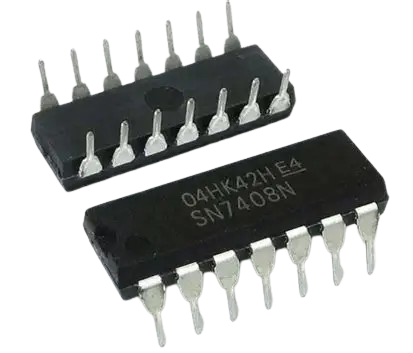
45+ 74-series ICs — datasheet accurate
The complete 74xx TTL IC library, simulated down to real logic-level behavior. Not approximations — actual pin layouts and timing from the datasheet, modeled to closely mirror your real bench.
Sensors, buzzers & a SPICE-style analog engine
IR break-beam pairs, an IR obstacle-avoidance module, and a piezo buzzer join the bench, all driven by a SPICE-style analog engine rather than scripted approximations.
Arduino sketches that actually run
Your sketch runs against the circuit step by step — Wire/I2C, SPI, EEPROM, Servo, LiquidCrystal, PWM, analogRead — so the circuit follows the code you wrote. Covers the Arduino subset of C++.
DLD lab simulator — open 24/7
Practice your digital logic design lab circuits any time. Wire a 7486 XOR gate, a 7474 D flip-flop, or a full adder built from 7483s — no lab booking needed.
Real burn & safety physics
Wire something wrong — say 20V into a 5V circuit — and the components actually burn out, closely mirroring how they would on a real bench.
Sub-circuits — build once, reuse anywhere
Save a circuit like a half adder, then drop it into any future build from the load menu — combine two to build a full adder in seconds.
Don’t see the component you need?
LogicBench’s library is always growing. If there’s an IC, sensor, or module you need that isn’t in the simulator yet, send us the part number and we’ll review the request.
Modeled to behave like your real bench.
LogicBench is built to behave the way real components do. Supply 20V to a circuit designed for 5V, and everything on that path burns out, closely mirroring how it would with real hardware. Use that to find the safe resistor and capacitor values before you ever pick up a soldering iron.
That makes it a strong validation step, not just practice: build and test your full circuit in LogicBench, confirm it behaves the way you want, then buy the real components and wire them following the same layout you validated on screen — instead of guessing and burning parts you paid for. As with any simulation, always double-check specs against your components’ real datasheets before powering up hardware.
5V → 20V
Overvoltage actually burns the part, mirroring real hardware.
Test → Buy
Validate the full circuit before spending money on parts.
Safe limits, found here first
Dial in the right resistor and capacitor values risk-free, before real components are on the line.
The complete 74xx TTL library, ready to wire.
LogicBench ships 45+ datasheet-based 74-series ICs — the same chips on your DLD lab bench. Each IC is simulated at the logic-level with the correct pin layout, so the skills and circuits you build here transfer directly to real hardware.
Use it as a DLD lab simulator before your practical, or as a digital logic design sandbox year-round. Gates, flip-flops, counters, multiplexers, adders — if it’s in the 74xx family, it’s probably already here.
7400
Quad 2-input NAND
7474
Dual D flip-flop
7483
4-bit binary adder
7486
Quad XOR gate
74138
3-to-8 line decoder
74151
8-to-1 multiplexer
74163
4-bit synchronous counter
74195
4-bit shift register
Design the logic first. Then wire it for real.
Six free tools, built as one connected suite: a K-Map solver, circuit diagram generator, truth table generator, Boolean algebra simplifier, a two-way FSM designer, and a lockout-checked counter designer. Solve your problem in the suite, then click Build — every result becomes a real circuit wired from actual 74-series ICs and flip-flops, ready to extend or reuse as a sub-circuit, not just a diagram.
Explore the suite →K-Map Solver
Click cells or type an expression — get the minimized SOP, the algebraic proof, Quine-McCluskey steps, a truth table, a waveform, and a real gate-level circuit you can build with one click.
Circuit Diagram
The unsimplified and minimized gate-level schematics side by side, with exact term and gate counts — and a Build button that wires either one from real ICs in the simulator.
Truth Table Generator
The full truth table and a synced timing waveform, generated from the same expression as your K-Map, circuit, and Quine-McCluskey steps — no retyping between tools.
Boolean Algebra Simplifier
Every simplification step named — De Morgan's, absorption, consensus — as an algebraic proof alongside the same problem's K-Map grouping and Quine-McCluskey merge passes.
FSM Designer
Draw the state diagram or fill in the transition table — either direction auto-generates the other, plus binary/Gray/one-hot state encoding, the excitation table, and per-flip-flop K-map equations, then builds as real flip-flop ICs.
Counter Designer
Binary, BCD, Gray, ring, Johnson, mod-N, or a fully custom sequence, up/down/up-down, on D, JK, or T flip-flops — with self-starting lockout recovery, a synchronous-vs-ripple design comparison, excitation equations, waveform, and a real flip-flop circuit.
Run digital logic labs for your class.
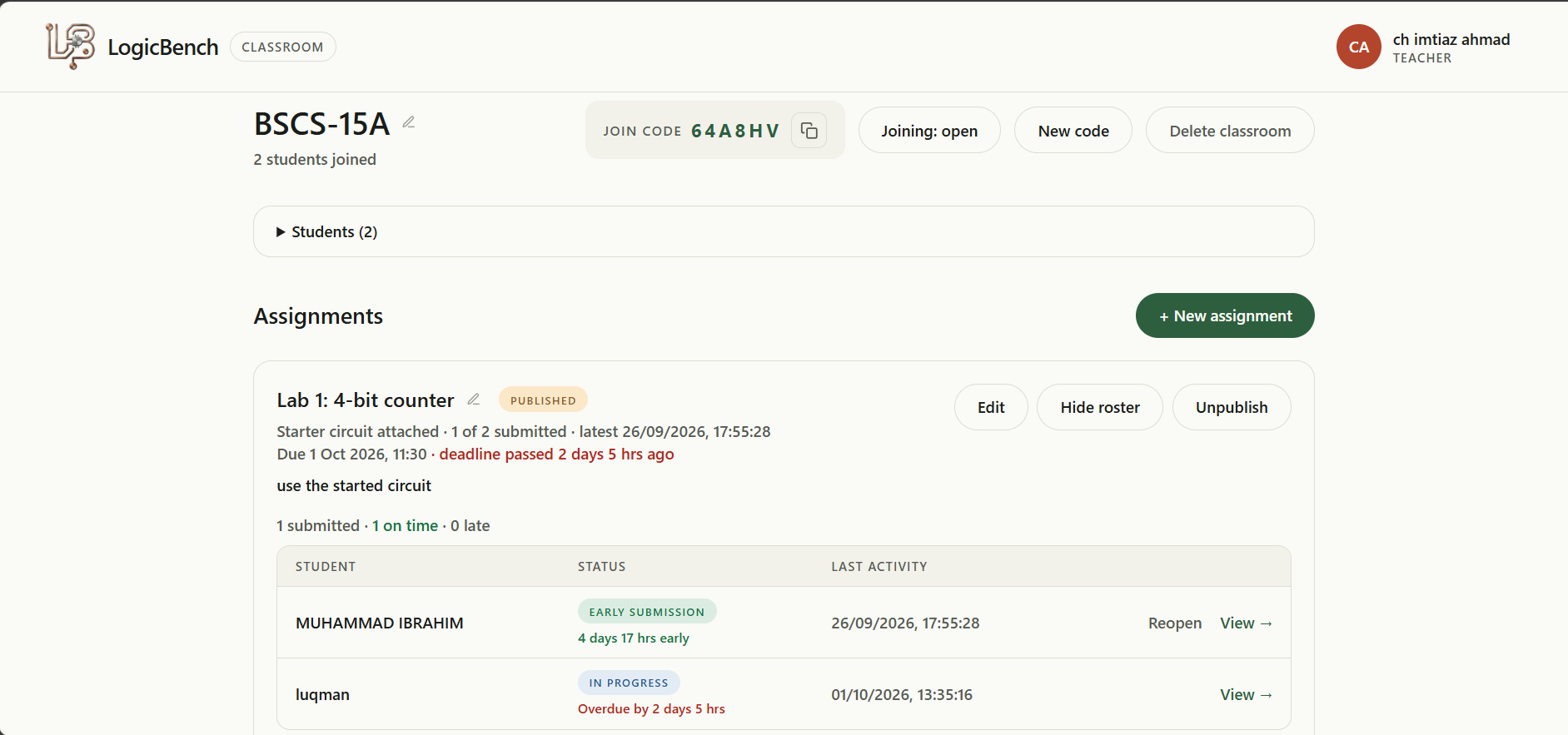
Run lab sessions and lab exams in the browser, with no lab hardware to buy. Teachers publish assignments and follow each student’s circuit as it’s built, and students save automatically and submit when they’re done.
Teacher portal
Create classrooms, share a join code, publish assignments and follow every student on one roster, then open any circuit to review it.
Student portal
Join with a code, open an assignment in the full simulator and submit in one click. Work saves to the cloud as you go, on any device.
Built-in integrity
Loading circuit files is disabled in assignments and submitted work is locked, so every submission is the student's own.
Prototype your electronics project before you build it.
Whether you’re building your first LED blinker or designing a custom PCB with a dozen ICs, LogicBench is the electronics simulator that lets you prototype, break, fix, and perfect your circuit before a single real component is ordered — or burned.
Test it in simulation first
From traffic light controllers to binary clocks to custom logic puzzles — build your hobby electronics project in LogicBench, verify every signal, then take it to the real breadboard with confidence.
Code + circuit together
Write your Arduino sketch and wire up the circuit in the same simulator. Test your pinMode() calls, analogRead() inputs, and I2C LCD displays all in one place — without plugging in a single USB cable.
Validate before you fab
Before you commit to a PCB order, simulate the full logic in LogicBench. Catch wiring errors, verify IC pinouts, and confirm timing — so your first PCB run is also your final one.
IR break-beam & obstacle avoidance
Wire an IR break-beam transmitter/receiver pair or an obstacle-avoidance module straight into your circuit or an Arduino sketch, pair it with a buzzer for an alarm, and test the whole sensor pipeline before ordering any hardware.
Astable, monostable, bistable
The 555 timer in LogicBench is a live physics simulation — adjust R and C values and watch the frequency and duty cycle update in real time. Great for tone generators, oscillators, and LED flashers.
From gates to systems
Start with AND, OR, NOT gates and build upward: half adders, full adders, comparators, decoders. LogicBench makes it easy to see how simple gates combine into real digital systems.
Digital logic simulator built for classrooms and workbenches.
Classroom
Teachers publish assignments, follow each student’s progress and review submissions. Students build in the simulator and submit, with no lab hardware needed. Live now, in beta.
Explore Classroom →Full simulator
Full-depth simulation — all 45+ ICs, sensors and modules, complete timing physics, and full Arduino C++ sketch support — for advanced students, hobbyists, and engineers prototyping real designs.
Launch the simulator →One simulator. Many kinds of builders.
From first-year engineering students to seasoned hardware hobbyists — LogicBench meets you wherever you are in your electronics journey.
Engineering & CS students
Practice DLD lab circuits, combinational logic assignments, and sequential circuit designs before the actual practical. No lab hours wasted figuring out a wiring mistake you could have caught in simulation.
Electronics hobbyists
Design and test your next hobby project — whether that's a custom counter, a signal generator, or a logic puzzle game — entirely in your browser before buying a single component.
Arduino & maker community
Prototype your full Arduino project — code and circuit — in LogicBench. Test sensors, actuators, LCD displays, and serial communication before your hardware even arrives.
Teachers & lab instructors
Run labs and lab exams in LogicBench Classroom: assign circuits, follow every student's progress and review each submission, with no lab hardware to buy or maintain.
Self-taught electronics learners
Learning from YouTube, books, or courses? LogicBench is the virtual lab where you put theory into practice — wire the circuit from the tutorial and see it work (or find out why it doesn't).
Embedded systems developers
Quickly validate peripheral wiring and microcontroller I/O logic before moving to real hardware. Combine Arduino sketch testing with IC-level circuit simulation in one free tool.
Everything you need in one free online electronics lab.
Most online circuit simulators either cover analog circuits or digital logic — rarely both, and almost never with real IC simulation and real Arduino support in the same tool. LogicBench is built around the 74xx TTL IC family from the ground up, with Arduino compilation added on top.
You get a virtual breadboard, a full TTL IC library, a working Arduino environment, IR sensors and buzzer modules, a 555 timer simulator, a SPICE-style analog engine, and burn-out physics — all free, all in your browser, and the simulator needs no account.
See the full comparison vs. Tinkercad & Wokwi →Start wiring in under a minute.
No signup walls. No installs. Just a breadboard and your ideas.
Launch the simulator